

How to Use Claude Code For Free With OpenCode Models
I built a Cloudflare Worker that lets Claude Code talk to OpenCode Go and Zen models, including free models like MiniMax M2.5 and Nemotron 3 Super.

Yes, you can use Claude Code for free by routing it through a small Cloudflare Worker and pointing that Worker at a free OpenCode Zen model like minimax-m2.5-free.
Claude stays the interface. OpenCode becomes the model layer.
That means you can keep the Claude experience people already like, skip Anthropic billing for low-stakes work, and only move to a paid provider lane when the task actually deserves it.
You see, at the end of March 2026, Anthropic shipped a Claude Code npm package with a source map inside it. That packaging mistake exposed a huge chunk of the Claude Code TypeScript source. Within hours, mirrors spread across GitHub. Some picked up thousands of stars and forks before Anthropic started sending takedowns.
Then the cleanup got messy. TechCrunch reported on April 1, 2026 that Anthropic’s DMCA request hit about 8,100 GitHub repositories before the company narrowed the scope.
That told me two things.
First, developers wanted Claude Code badly enough to swarm the leaked source. Second, the demand for using Claude’s interface with other provider lanes was already there.
All this landed at a weird time for me. I’ve already shifted a lot of my own coding time to Codex, mostly because GPT got close enough to Opus for my day-to-day work and the usage limits feel better. Hermes still handles my heavier recurring workflows and automations.
But I still liked Claude Code. And I still wanted to try Claude Cowork without paying the full Anthropic tax every time I wanted a polished coding session.
The problem was simple.
Claude speaks Anthropic. OpenCode Zen and OpenCode Go mostly speak OpenAI-compatible endpoints.
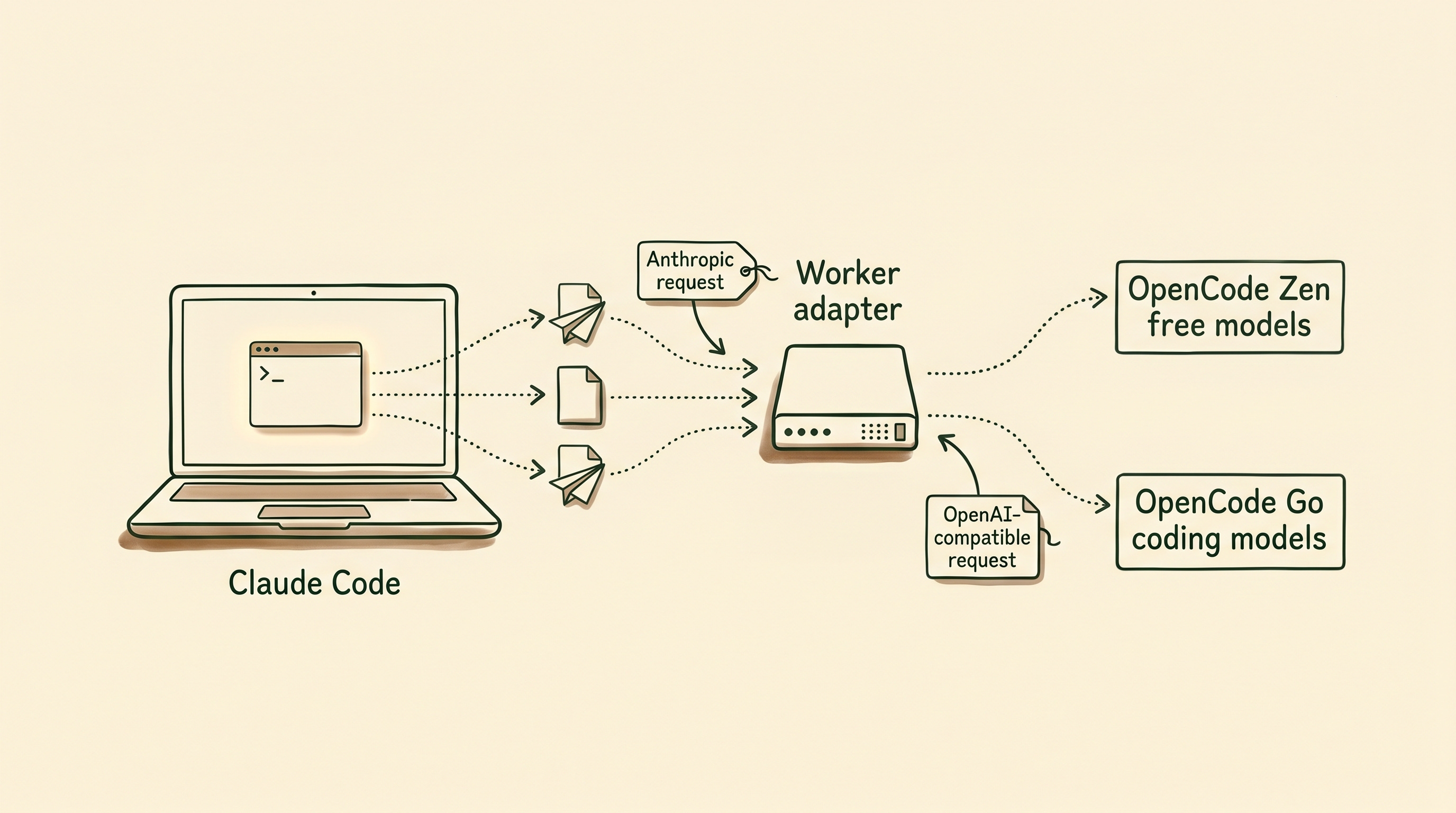
So I built a translator.
The OpenCode Cowork Proxy Worker lets Claude Code talk to OpenCode Go models and selected OpenCode Zen models. Claude keeps sending Anthropic-style requests, then the Worker translates them into the upstream format OpenCode expects.
No key storage. No message storage. Just a format bridge.
With that in place, you can start with free OpenCode Zen models like minimax-m2.5-free, then move to OpenCode Go’s subscription lane when the work gets more demanding.
I made the switch easy on purpose. You need a Cloudflare account and an OpenCode account. Both can start free, and you only upgrade if the workflow becomes worth it.


In This Article:
How to install the Worker in your Cloudflare account
How to configure a third party gateway in Claude desktop
How to use Claude Code for free with OpenCode models
When to use
/zenand when to use/goThe first safe test to run before touching a real repo
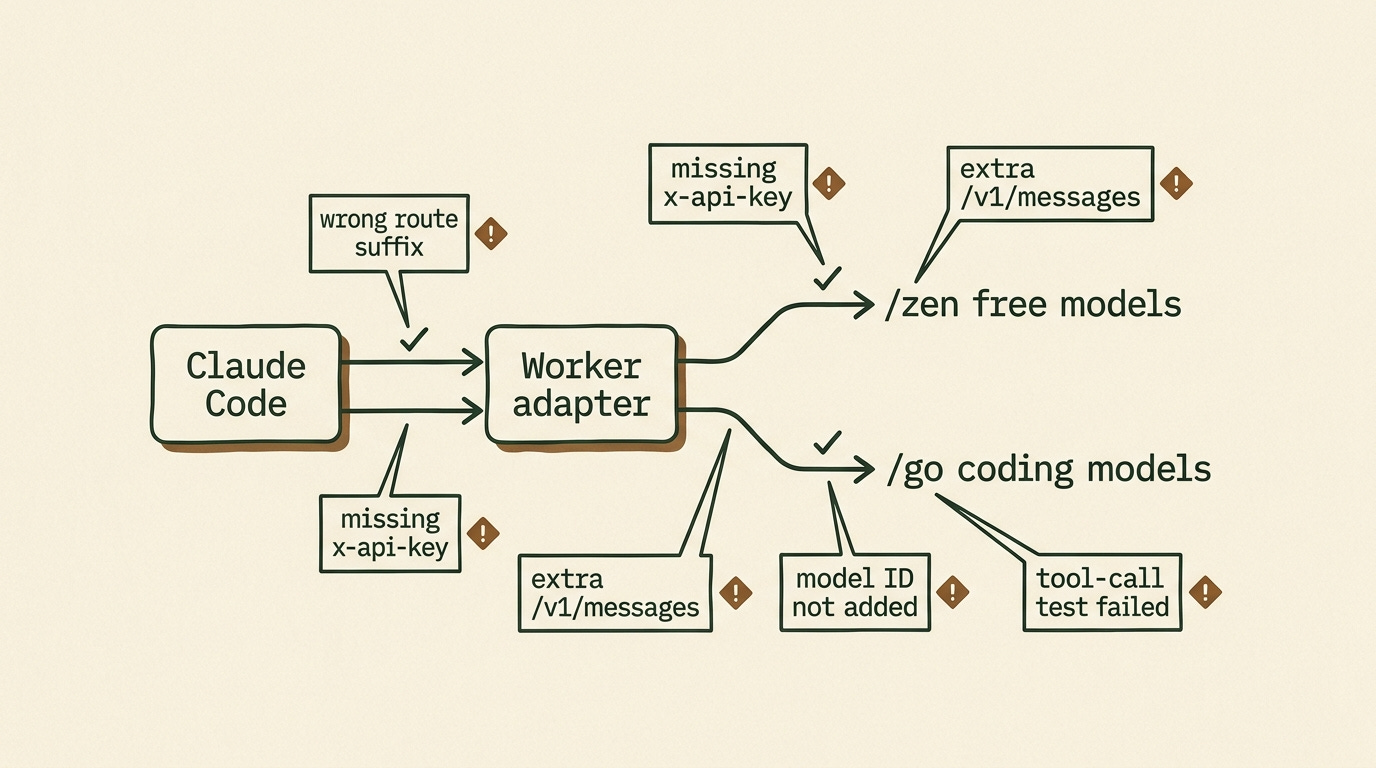
The setup mistakes that break this first
Deploy the Worker in Cloudflare First
Before Claude can use OpenCode, you need a gateway URL it can call.
Open the OpenCode Cowork Proxy Worker repo and click the Deploy to Cloudflare Workers button at the top. Cloudflare supports this one-click deploy flow directly for Workers projects, which is why this setup is fast to hand off.
Cloudflare walks you through the rest. When it finishes, copy your Worker URL.
At that point, your gateway is live.
Your deployed URL will look like your own Cloudflare Worker endpoint. In the examples below, I’ll call it:
YOUR_DEPLOYED_WORKER_URLConfigure Claude Desktop to Use OpenCode Zen
Open Claude Desktop and go to the third-party inference setup.
If you’re on Windows, go to:
Help > Troubleshooting > Enable Developer ModeClaude will restart and expose a new menu:
Developer > Configure Third-Party InferenceAnthropic’s current help docs for Claude Cowork’s third-party setup use this same path, so you’re not relying on a weird hidden hack here. You’re using the intended setup UI.
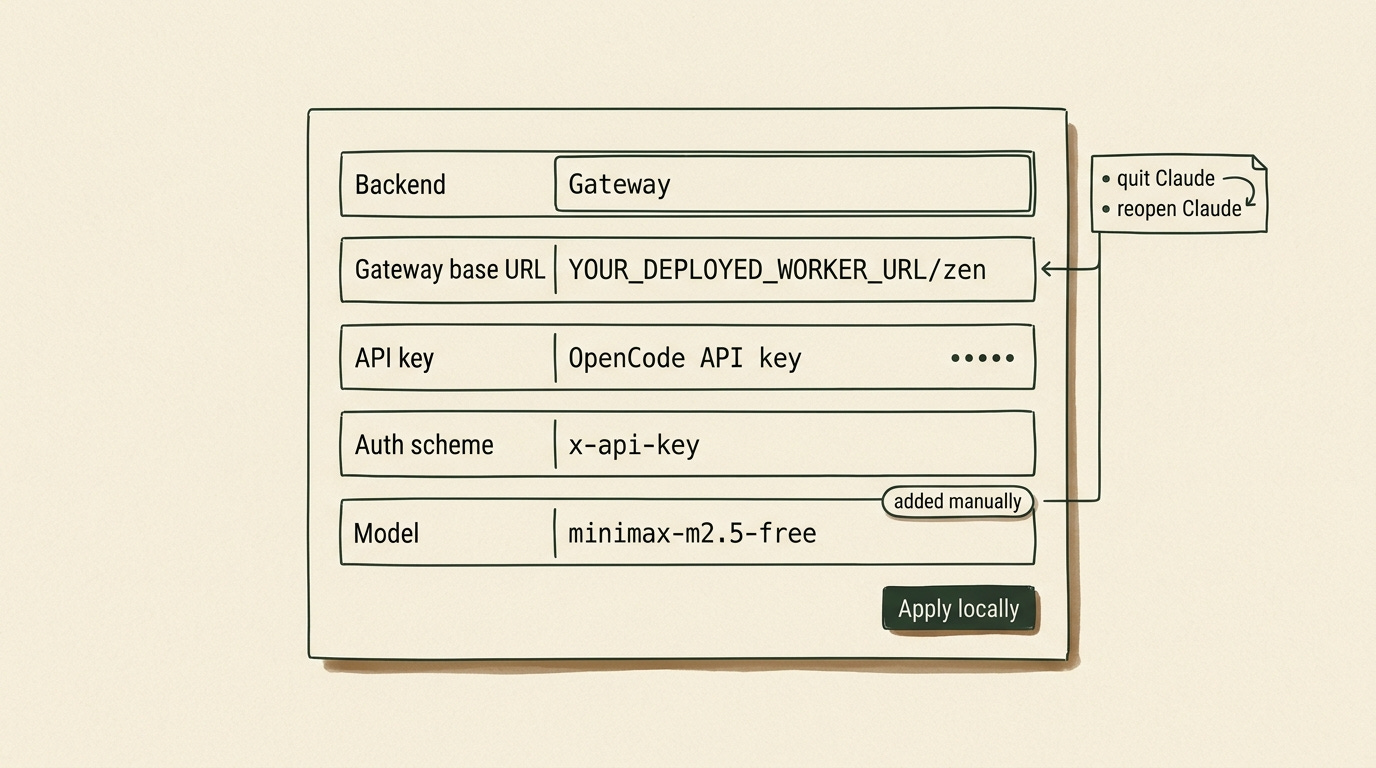
For your first test, point Claude at OpenCode Zen with the free model minimax-m2.5-free:
Backend: Gateway
Gateway base URL: YOUR_DEPLOYED_WORKER_URL/zen
API key: your OpenCode API key
Auth scheme: x-api-key
Model: minimax-m2.5-free
Once that’s done, make sure to add the model manually too:
minimax-m2.5-freeClick Apply locally. Fully quit Claude Desktop. Reopen it.
That’s the basic path for using Claude Code with a free OpenCode model through your Worker.
Start with Free OpenCode Zen Models
Start with OpenCode Zen, not Go.
Zen is OpenCode’s curated model gateway. Some Zen models are paid. Some are free for a limited time while model teams collect feedback.
Last updated: May 7, 2026
The current OpenCode Zen docs list these free models:
minimax-m2.5-free
ling-2.6-flash
hy3-preview-free
nemotron-3-super-free
big-pickle
Use this first:
minimax-m2.5-free
Your base URL should end with:
/zen
Your model field should be:
minimax-m2.5-free
Free means free while OpenCode is offering that model under a free period. It does not mean no account, no API key, or no caveats.
You still need an OpenCode API key.
And you should absolutely check the privacy notes before using free models with sensitive work. As of May 7, 2026, OpenCode’s Zen docs say several free models may use collected data during the free period to improve the model. That includes minimax-m2.5-free. This is the exact opposite of the lane you want for sensitive code.
This is the test lane.
Use it for summaries, low-risk code review, documentation cleanup, and tiny file edits in a throwaway folder. Don’t start by pointing it at your main repo with write access.
On my own first tests, the free Zen route handled summaries, low-risk reviews, and tiny file edits fine, but I switched to /go as soon as I wanted stronger reasoning over a larger repo.
I wrote about the bigger reason open models matter in Ditch Your Subscriptions and Run Open Source AI on Your Device. The short version is the same here: model choice gets more useful when your tools stop forcing the interface and the engine to stay married.


Choose /zen for Free Models and /go for OpenCode Go
The proxy has two routes.
Use /zen for free models and Zen pay-as-you-go models:
YOUR_DEPLOYED_WORKER_URL/zen
Use /go for the monthly OpenCode Go subscription lane:
YOUR_DEPLOYED_WORKER_URL/go
If you want the fast mental model, use it like this:
/zenis the free test lane/gois the stronger daily-work lane
As of May 7, 2026, the OpenCode Go docs list Go at $5 for the first month, then $10 per month.
The same docs currently list these usage limits:
5-hour limit: $12 of usage
Weekly limit: $30 of usage
Monthly limit: $60 of usage
Your actual request count depends on the model.
Cheaper models stretch much further. Heavier models burn the limit faster.
The important privacy distinction is this: OpenCode Go says its providers follow a zero-retention policy and do not use your data for model training. That makes it a much better fit for real coding work than the free-model lane. I would still avoid calling anything “complete privacy,” but it is the safer route according to the current docs.
I covered OpenCode Go more broadly in The $30 Hermes Stack That Makes Claude Max Look Like a Ripoff. For Hermes, Go gives you a cheaper provider lane. With this proxy, Go becomes useful from Claude Code too.
Why This Route Instead of OpenRouter or Ollama?
Because the point here is not just “find any cheaper provider.”
The point is keeping Claude’s interface and tool flow while swapping the model layer underneath it.
If you just want the fastest generic provider swap, OpenRouter is simpler.
If you want fully local inference, Ollama is a better answer.
If you specifically want Claude Code or Claude Cowork as the front end while OpenCode handles the models behind the scenes, this Worker route is the right tool.
That matters more than it sounds. A lot of people do not actually want a new interface. They just want a cheaper or more flexible inference lane behind the interface they already like.
If you want the broader comparison between Claude Cowork and other agent setups, I broke that down in OpenClaw vs Claude Cowork vs Perplexity Computer - Which AI Agent Actually Fits Your Life.
Test Claude Code Safely in a Throwaway Folder
Don’t point this at your main repo first.
Create a throwaway folder:
claude-opencode-proxy-testAdd a file:
project-notes.mdPut fake project notes in it. No secrets. No client data.
Ask Claude Code:
Read project-notes.md.
Summarize the project in 10 bullets.
Create a second file called next-actions.md with a short implementation checklist.
Do not modify project-notes.md.
This checks whether routing and tool behavior work together. Claude has to create the new file from the notes without touching the original.
If that works, try a small code review:
Review this function for bugs.
Do not edit files yet.
Give me the risk list first.
I like that second test because it keeps the model away from edits until you see how it behaves.
After that, test one small tool-heavy task. Ask it to compare two files and create a short note. Keep the task boring.
You’re testing routing and tool behavior, not the model’s taste.
Free models are useful, but they need judgment. I wrote about that line between vibe coding and agentic engineering in The Agentic Engineering Shift.
Switch to OpenCode Go When the Free Lane Stops Being Worth It
OpenCode Go is one of the more transparent AI subscriptions out there because the limits are expressed in dollar value, not in a vague “come back later” chat cap.
Switch to /go when the free Zen models are too weak, too slow, too rate-limited, or too risky for the work.
That usually happens when one of these becomes true:
You want better reasoning over a bigger codebase.
You want fewer caveats around data usage.
You are doing enough coding work that a $10 lane is cheaper than burning a premium subscription elsewhere.
The nice part is that the setup barely changes. You keep Claude as the interface. You just swap the route and the model.
I covered OpenCode Go in The $30 Hermes Stack That Makes Claude Max Look Like a Ripoff. For Hermes, Go gives you a cheaper provider lane. With this proxy, Go becomes useful from Claude Code too.
How This Also Works with Claude Cowork
This is the part I care about more than the free model itself.
People like Claude Code and Claude Cowork because the interface feels good to use, and nobody wants another subscription with fuzzy limits hanging over every small coding session.
Claude Cowork especially has the kind of product polish that makes people want to stay inside it. The project view feels clean, the tool activity is easy to follow, and the whole thing feels closer to an app than a pile of agents you have to babysit.
The annoying part is paying for the whole Anthropic route every time you want that app experience.
I can justify premium reasoning models when I’m asking for difficult architecture help or reviewing a risky change. I do not want to burn premium usage on every small housekeeping task.
That’s why I built this proxy, and I want the compatibility point to be explicit: this route works with Claude Cowork too. You can keep Claude Cowork or Claude Code as the place where you work without needing Claude itself as the model route behind it.
The cheap path lets you keep the Claude app experience instead of forcing yourself into another interface.
You can start with a free OpenCode Zen model, then move to the $10 OpenCode Go lane when you want a stronger open model inside Claude Cowork or Claude Code.
I still like OpenCode. I still use Codex. Hermes is still where my serious recurring workflows live. The point is that Claude Cowork does not have to become another expensive subscription decision when OpenCode can provide the model layer for free or for far less.
If you want the shared-workflow version of that story, read OpenClaw or Claude Cowork? Here’s How to Plug Both Into the Same Brain.
Use This 10-Minute Checklist to Get Started
Open the OpenCode Cowork Proxy Worker repo.
Click Deploy to Cloudflare Workers and install the Worker in your Cloudflare account.
Copy your deployed Worker URL.
Open Claude Desktop.
Enable Developer Mode, then open Configure Third-Party Inference.
Set the base URL to
YOUR_DEPLOYED_WORKER_URL/zen.Set auth scheme to
x-api-key.Paste your OpenCode API key.
Add
minimax-m2.5-freemanually.Click Apply locally, fully quit Claude, then reopen it.
Run the throwaway-folder test.
Switch to
YOUR_DEPLOYED_WORKER_URL/goand a Go model when you want the subscription lane.

Grab the Worker, run the throwaway-folder test, and star the repo if it works for you. Stars tell me which Claude/OpenCode routes are worth maintaining next.

FAQ
Can I use Claude Code for free?
Yes, but not in the default Anthropic-billed path this article is bypassing.
You use Claude Code for free here by routing its requests through your own Cloudflare Worker and pointing that Worker at a free OpenCode Zen model such as minimax-m2.5-free.
Is Claude Code in VS Code free?
Claude Code itself can be installed, but the model path behind it usually costs money unless you route it to a free provider lane.
This setup gives you one of those free lanes.
How do I get Claude Code credits for free?
You don’t get Anthropic credits from this method.
You bypass Anthropic billing for these sessions by translating Claude’s requests to a free OpenCode Zen model instead.
How do I use Claude Code free forever?
“Forever” is doing too much work in most of the videos and posts ranking for this topic.
You can use it free as long as a provider keeps offering a free model and the setup still works. That can change. That’s why this article treats the free route as a useful lane, not a permanent law of nature.
External Sources Worth Checking
If you want the primary docs behind this setup, start here:
And if you want the leak story source rather than my summary, TechCrunch covered the takedown incident here:
Happy you find it useful, and yep, this can be used anywhere, including the terminal. The proxy just converts Anthropic style API to OpenAI compatible API and vice versa.
I plan on expanding the proxy to work with other subscriptions as well. I'm even thinking of enabling the OpenAi api directly, but using GPT inside Claude Code might make your computer explode 😂
This article has me really excited, Dan. Thanks for putting this proxy together, I’m definitely going to try it. I’m currently running OpenZen with Kimi 2.5 because MiniMax felt too slow, and over three weeks I spent under $5 on Hermes. I’m still testing my actual consumption before locking in the $10 Go plan. One question: can this setup be used from the terminal as well?